New for Carpathian guest house and hotel owners: a free availability calendar, booking requests in Telegram and statistics

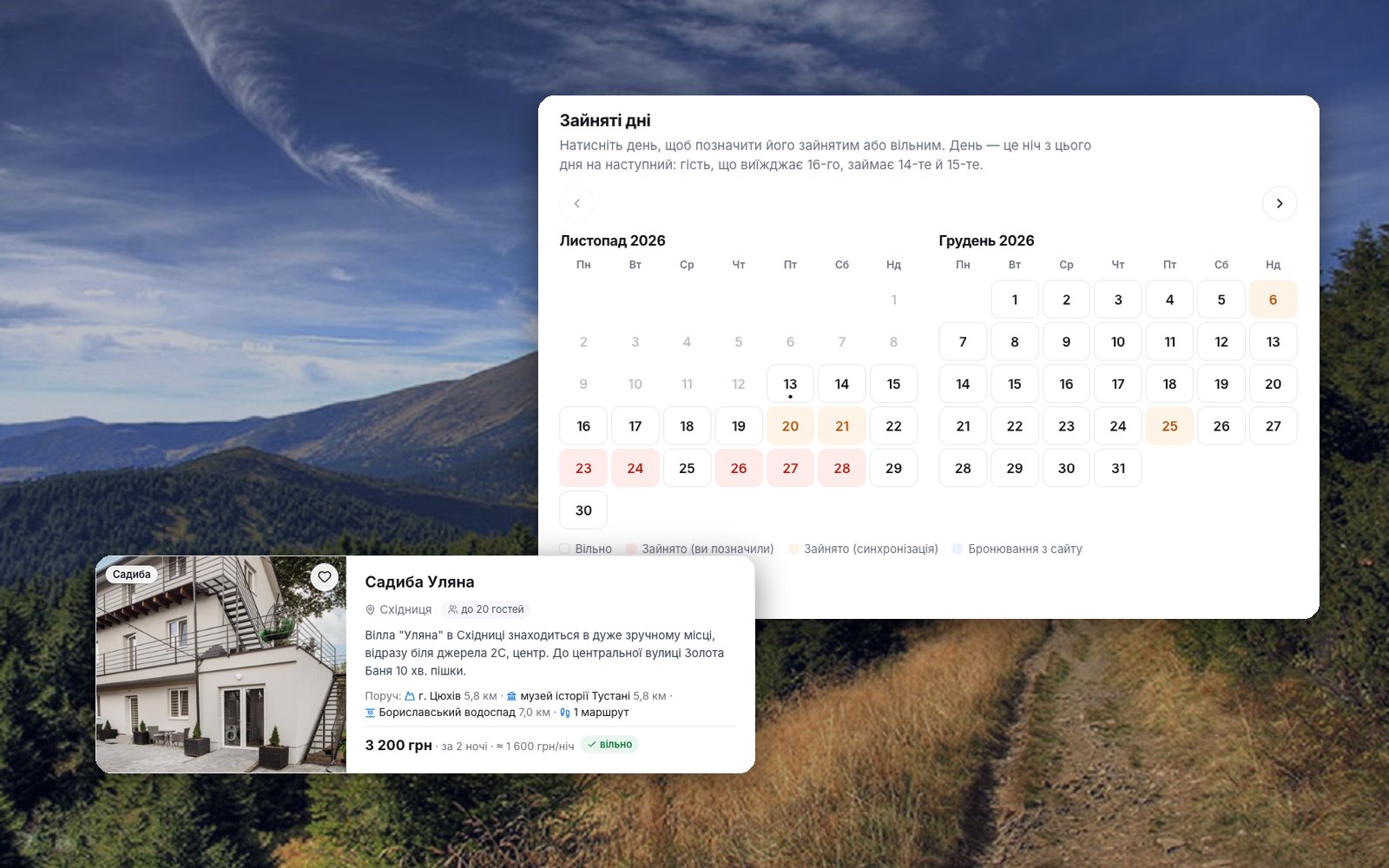
Guests increasingly look for a place to stay not "somewhere in the Carpathians" but for a specific weekend: from the 20th to the 22nd, two adults and a child. Until now, the page of your sadyba (a family-run guest house) showed them only a phone number — and they had to call a dozen owners to find out who was free. We have changed that. Every owner who has listed a place on Karpaty.Rocks can now show free dates and receive booking requests, free of charge.
In short: what is new
- An availability calendar for a sadyba, cottage or hotel listed in your account.
- Sync with Google Calendar, Booking.com and Airbnb via iCal — and an export of your calendar back.
- Booking requests from guests by e-mail and in Telegram, with «Confirm» and «Decline» buttons.
- An «available» badge in the dated search — your place appears in the same list as hotels with online booking.
- A new owner account with statistics: page views, phone reveals, calls, Google impressions and requests.
- Free, with no commission and no online payment: guests pay you directly.
How to switch on the calendar: 3 steps
- Add your place or sign in to your account. You can add a place without registering in 5–10 minutes. Be sure to enter a price per night — the calendar cannot be switched on without it.
- Open the calendar from the account menu and switch on «Show free dates on the site». Choose how you rent: «Whole property» or «Rooms separately».
- Mark busy days (tap a day or mark a whole period) or connect a sync, and then connect Telegram so requests arrive instantly.
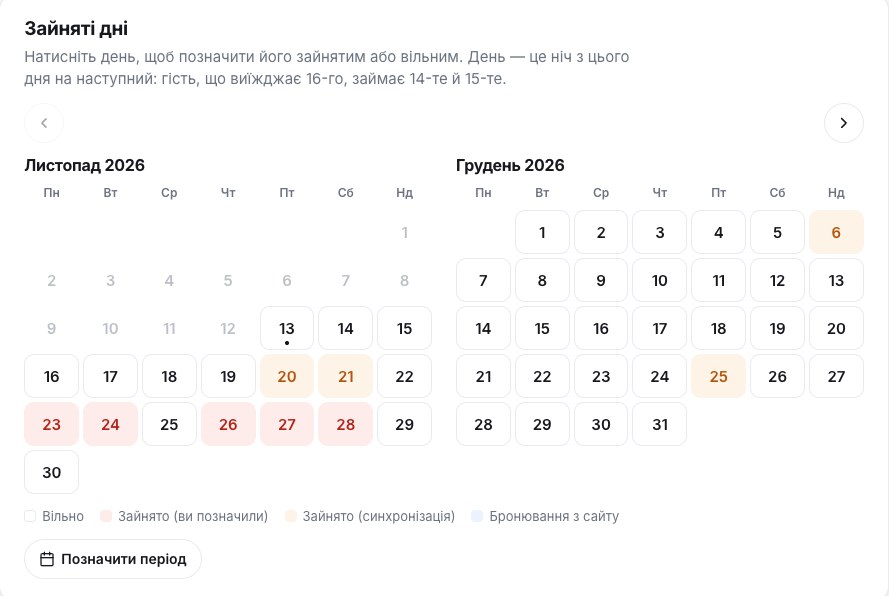
A day in the calendar is the night from that day to the next. A guest who arrives on the 14th and leaves on the 16th takes the 14th and the 15th; the 16th stays free for the next guests. Past days cannot be changed.
The whole house or separate rooms
A sadyba or cottage you rent out as a whole has one calendar for the entire house: each day is either free or busy. Capacity is how many guests the whole house sleeps, and the price is for the whole place.
A hotel or a sadyba with separate rooms: choose «Rooms separately» and add room types with a count — «Standard — 6», «Family — 2». For each type, enter how many guests it takes and the price per night. For every day you mark how many rooms of that type are already taken; the rest are free. Guests see a room type as available if at least one room is free for all their nights.
Sync with Google Calendar, Booking.com and Airbnb
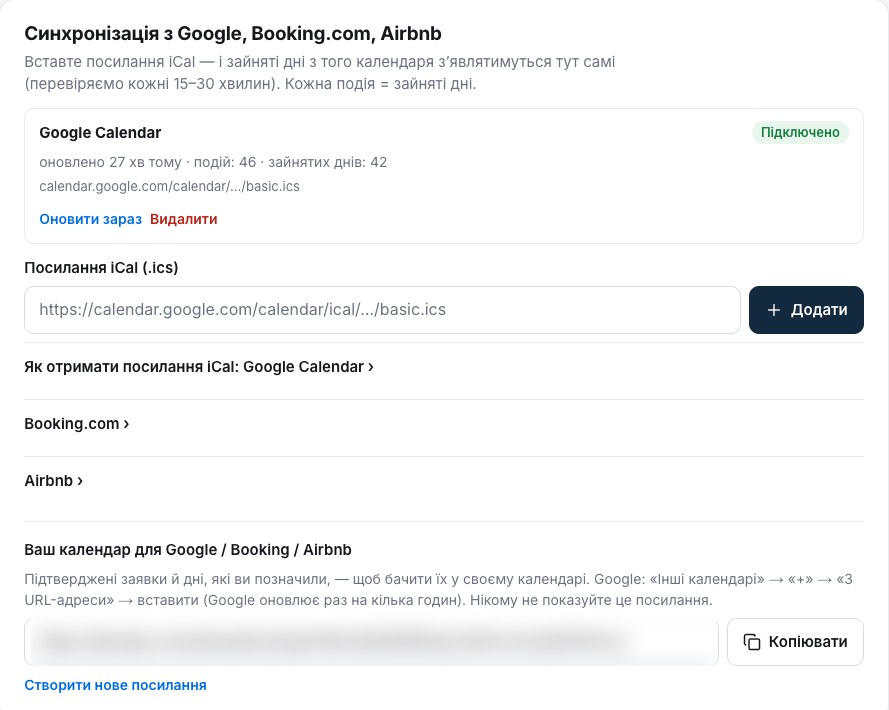
If you already manage bookings elsewhere, there is nothing to duplicate. Paste an iCal link (an .ics file) and the busy days from that calendar will appear here on their own. We check the link right away and then every 15–30 minutes. Each event means busy days from check-in to check-out; cancelled events are ignored. You can add up to 5 links per place.
- Google Calendar (on a computer): Settings → pick the calendar → «Integrate calendar» → «Secret address in iCal format».
- Booking.com: Extranet → Rates & Availability → Sync calendars → Export calendar.
- Airbnb: Calendar → your listing → Availability → Connect to another website → Export calendar.
It works the other way round too. Your account has a personal link to your Karpaty.Rocks calendar with confirmed requests and the days you marked. Add it to Google Calendar («Other calendars» → «From URL») or import it into Booking.com or Airbnb, and bookings from our site will never overlap with your others. Google refreshes such calendars every few hours. Keep the link private; if needed, you can create a new one in your account and the old one stops working.
Requests by e-mail and in Telegram
A guest picks dates and the number of guests, sees the price for the whole stay and presses «Book now». Name, e-mail and a message are optional; a phone number is required. Within seconds the request reaches you by e-mail and in Telegram, if you have connected it («Connect Telegram» → our bot → «Start»). Telegram shows «Confirm» and «Decline» buttons; the e-mail has the same links.
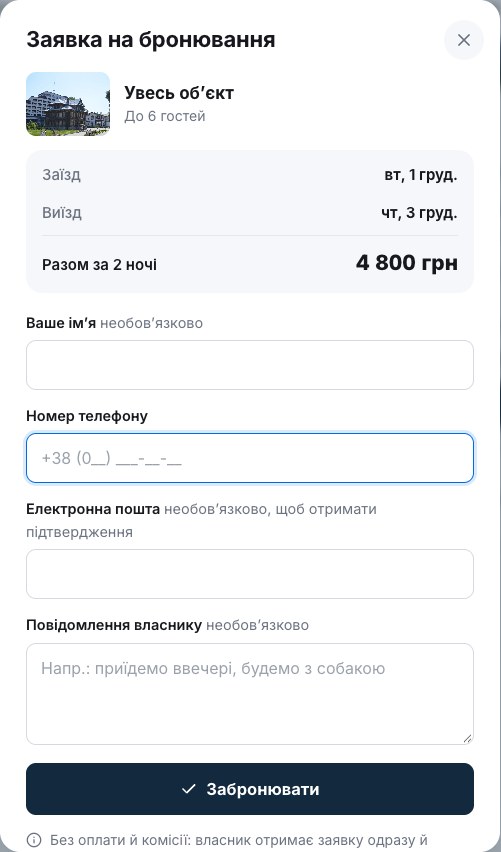
Then it is business as usual: call the guest, agree on payment and details directly, and press «Confirm». The dates become busy in your calendar. If the guest left an e-mail, they receive a message with your decision. Requests nobody answers by the arrival date close on their own.
How guests see your place
Your page gets a «Prices and available rooms» block: the guest picks dates, busy days are crossed out, and the «Choose» button opens the request form. Next to the calendar guests see when you last updated it.
Even more important is the dated search on the home page, in Accommodation and on town pages. If you are free on the chosen dates, your place appears in the same list as our online-booking partner’s hotels — with the price for the whole stay and a green «available» badge. In the «Recommended» order, owners’ places with a fresh calendar are mixed in, roughly every third result. And if you are booked on those dates, we do not show your place, so nobody calls you in vain.
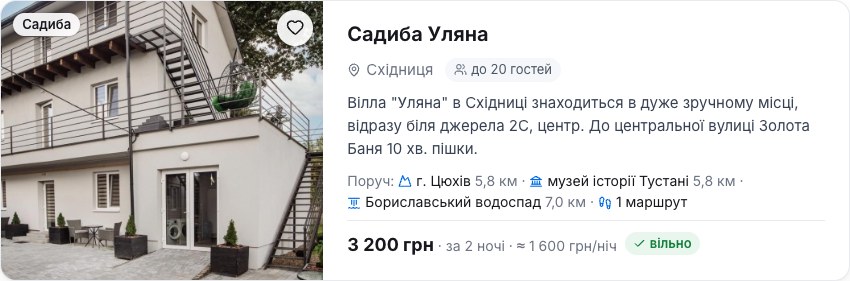
The 30-day rule: keep the calendar alive
The worst thing for a guest is a request for dates that were taken long ago. So the calendar counts as up to date if in the last 30 days you changed it, pressed «All up to date», or an iCal sync ran successfully. Otherwise free dates are hidden and the page shows only the phone number, as before. Three days before that we send a reminder by e-mail and Telegram. One press of «All up to date» brings everything back.
The new owner account and statistics
The owner account now matches the site design, and its first page shows «Last 30 days»: page views, how many times guests revealed your phone number, how many tapped «Call» on a mobile, how often Google showed your page in search, and how many requests arrived. Each figure is compared with the previous period and comes with a small chart. On the Statistics page you can pick 7, 30 or 90 days or your own period, and a «What to do next» block suggests what to add so your page works better.
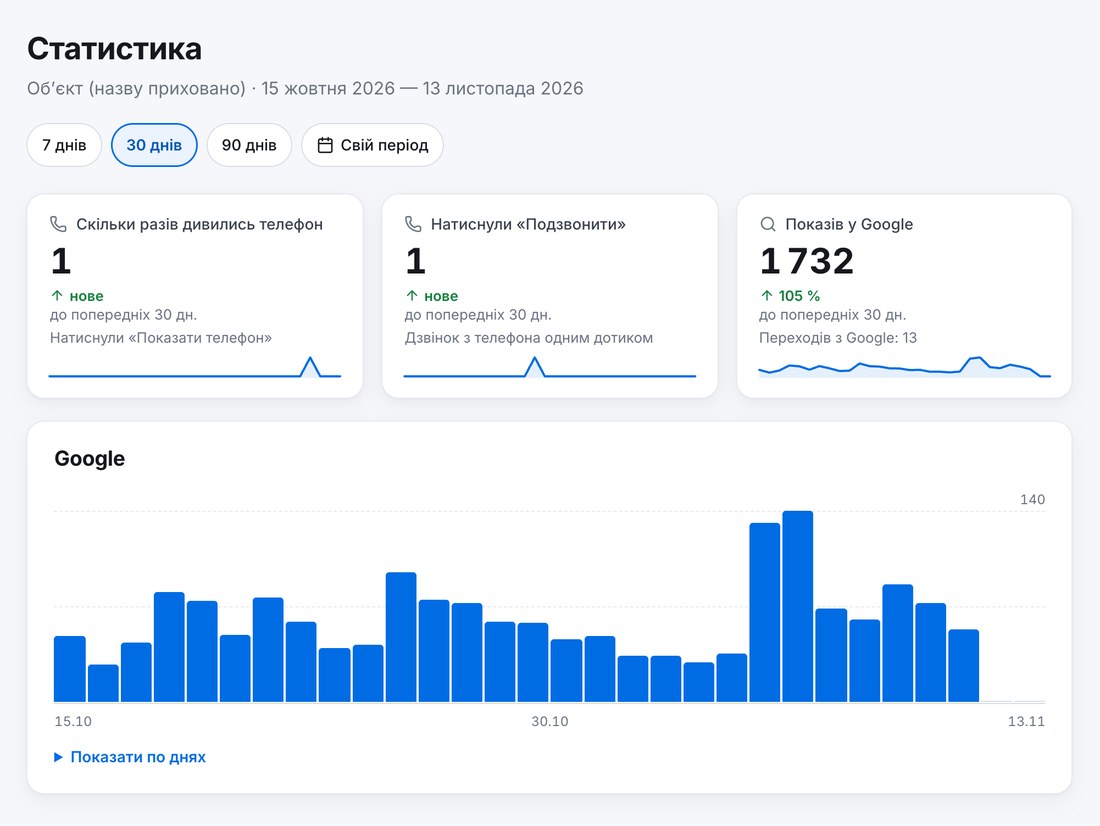
How much does it cost
Nothing. The calendar, requests and statistics are part of the free listing. We take no commission on bookings and accept no online payments: the money goes from the guest straight to you. If you want more attention for your place, there is advertising on the site.
Frequently asked questions
Is it really free?
Yes. The availability calendar, sync, booking requests and statistics are free for every owner who has listed a place on Karpaty.Rocks.
What commission does Karpaty.Rocks take on bookings?
None. We do not stand between you and the guest: the request comes to you, and you agree on payment with the guest directly.
Can guests pay online?
No, there is no online payment. The guest sends a request, you call them and agree on a deposit or payment on arrival, whichever suits you.
What happens if I forget to update the calendar?
After 30 days without changes, without pressing «All up to date» and without a successful sync, free dates are hidden and the page shows only your phone number. We send a reminder three days before. A sync with Google, Booking.com or Airbnb keeps the calendar fresh on its own.
Can I keep a calendar for several rooms?
Yes. Choose «Rooms separately» and add room types with a count, e.g. «Standard — 6». For every day you enter how many rooms are taken.
My place is already on the site, but I have no account. What should I do?
Sign in with e-mail or Google and confirm your phone number with an SMS code. If that number is on the listing, the place will appear in your account automatically.
Own a sadyba, cottage or hotel in the Carpathians? Add your place for free, or sign in to your account and switch on the calendar. Questions? Write to [email protected].
Comments
Travellers’ experience: reports, tips, questions.
No one has written here yet. Be the first — your experience helps others.
You may also be interested in
All articles Sadyba, cottage, koliba or hrazhda: where to stay in the CarpathiansSadyba, cottage, guest house, koliba, hrazhda, staia: what each Carpathian word means, where you can actually spend the night and how to...
 Christmas and New Year in the Carpathians 2026/27: where to go, traditions, foodWinter holidays in the Ukrainian Carpathians are more than a tree and fireworks. Hutsul carollers going from house to house, twelve...
 Winter hiking in the Carpathians: safety, gear and easy routesThe Carpathians are beautiful in winter, but they don’t forgive mistakes: short days, ice, wind on the ridges and avalanches up high....
